Documentation / Getting Started
Back to docs hub

Help new users understand BullHorns Matrix through a clear first-day path.

This page is based on real product screenshots. Instead of abstract feature lists, it shows where new users should look first, what to do next, and how devices and accounts form the real operational foundation.

Open User Login Explore Product
Product Perspective

What this document solves

First-time users usually do not struggle with clicking buttons. They struggle with sequence and mental model. This page focuses on that missing entry point.

  • It explains the product as an operational system, not a disconnected feature list.
  • It highlights what a new user should understand on the first screen from a product-management perspective.
  • It keeps the experience readable across light and dark themes with low visual noise.

Start with the dashboard to build system awareness

The dashboard is not just a welcome screen. It is the business overview of the whole user side. A new user should first confirm membership status, device capacity, balance structure, and task health.
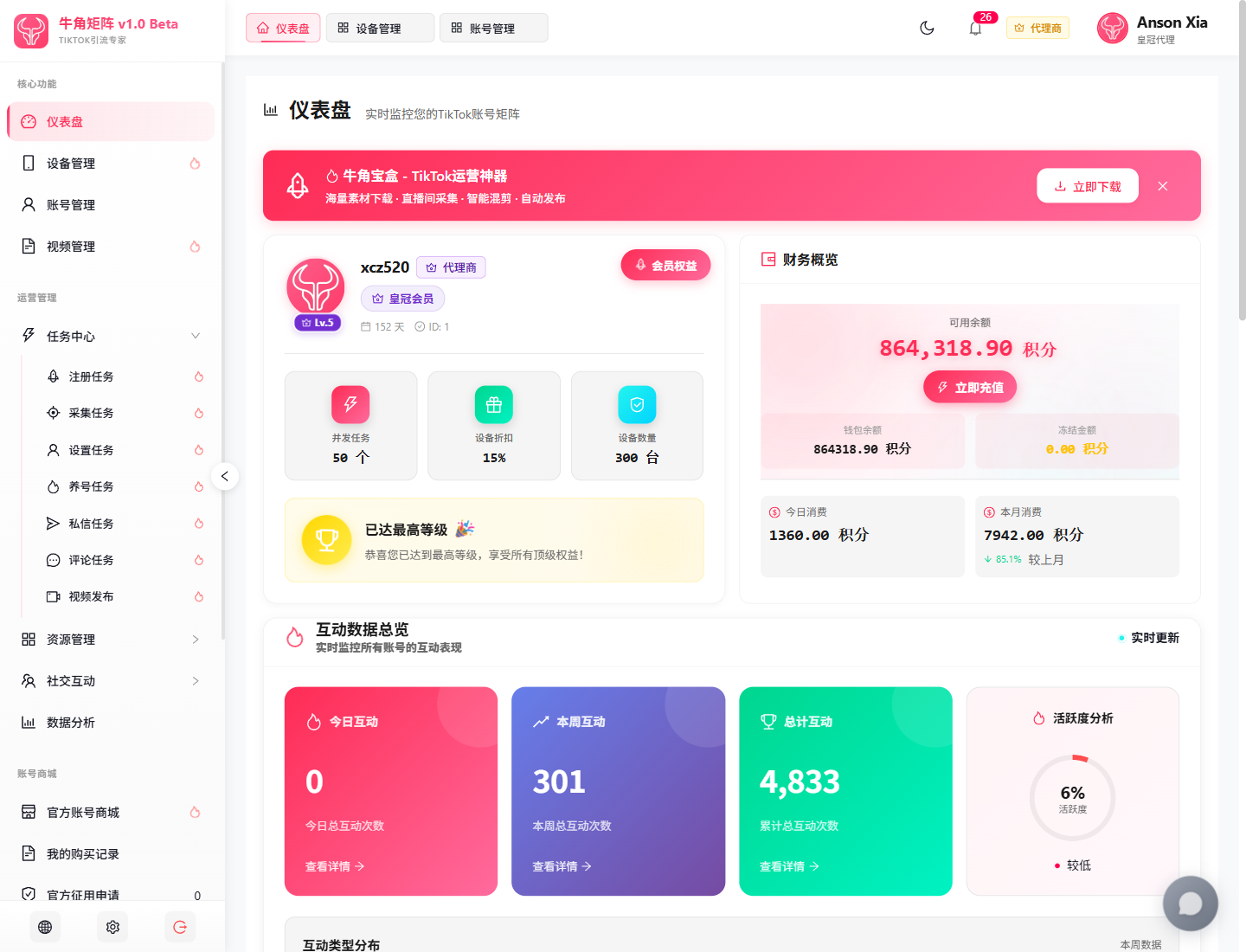
Real Product Screenshots 1440 x 1100
BullHorns Matrix dashboard screenshot showing membership info, financial overview, and engagement summary

Focus Points

Top membership card

It summarizes account level, remaining time, concurrent tasks, device discount, and device capacity in one operational overview.

Financial overview

Available balance, frozen amount, today spend, and monthly spend help new users understand the points system immediately.

Engagement overview

Daily, weekly, and cumulative engagement metrics show whether the matrix is actually running or still idle.

Left-side navigation structure

Core features, operations, account store, and personal tools are clearly grouped, which helps new users understand the system boundary fast.

Action Checklist

Confirm operating capacity

Check balance, device volume, and membership rights before trying any downstream operation.

Confirm whether the account is already in operation

If metrics such as engagement, video count, or account count already exist, the workspace may already be running real business.

Identify the next page

After the dashboard, the correct next stop is device management rather than task execution.
Prepare devices before building a stable runtime environment

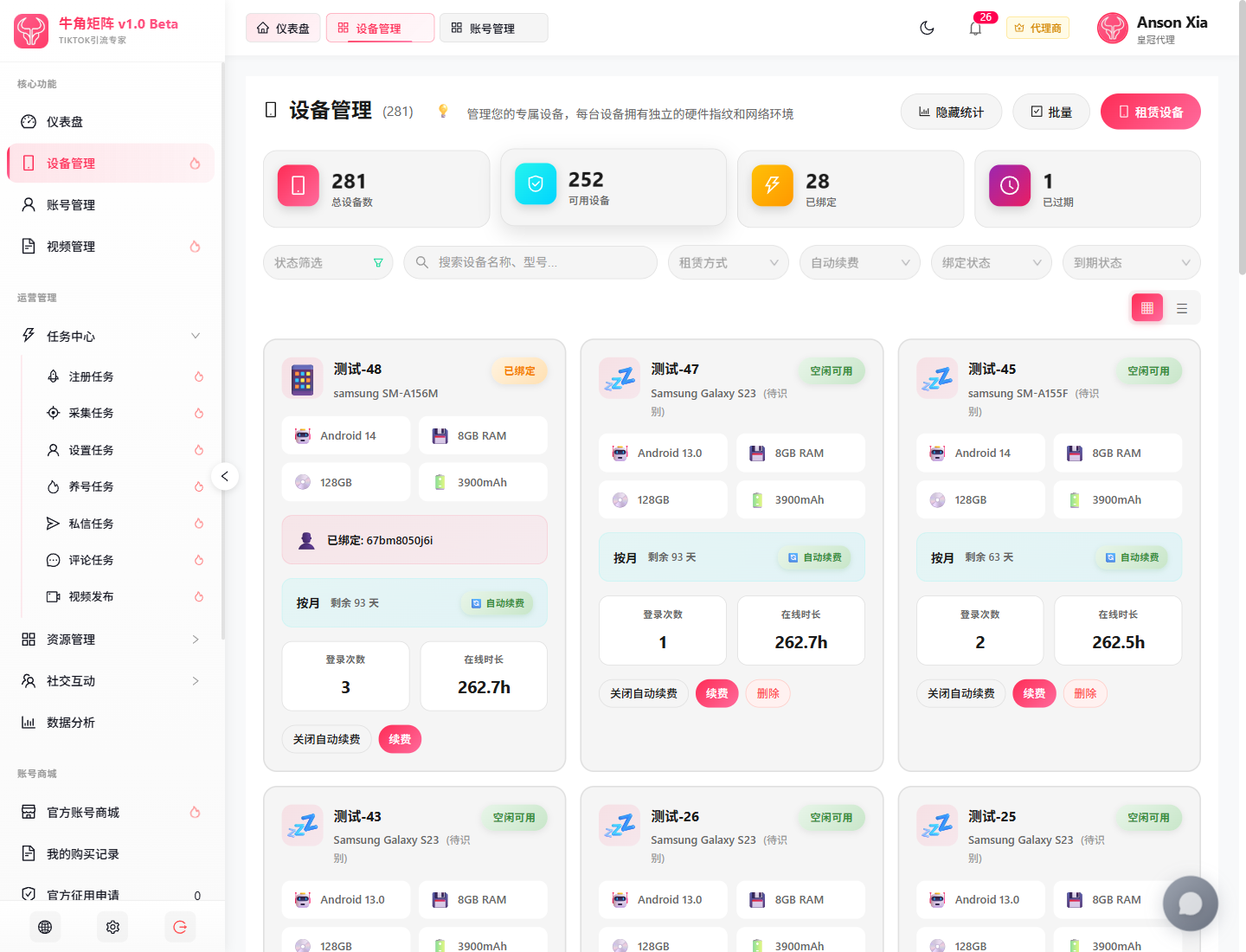
Device management is one of the most foundational modules in BullHorns Matrix. Each device carries a distinct hardware fingerprint and network environment, which is critical for stable TikTok account operation.

Real Product Screenshots 1440 x 1100
BullHorns Matrix device management screenshot showing device metrics, filters, and device cards

Focus Points

Top device metrics

Total devices, available devices, bound devices, and expired devices directly affect how much account operation the workspace can carry.

Filtering system

Status, rental model, auto-renew, binding status, and expiry filters become essential once device scale starts growing.

Device card structure

Each card exposes model, system, memory, storage, battery, account binding, expiry, and auto-renew state in one place.

Renewal actions

These controls are not administrative noise. They are real operational risk controls that protect uptime and account continuity.

Action Checklist

Verify available devices first

If there are no devices, rent them. If devices exist, verify usability and expiry state before anything else.

Enable auto-renew on critical devices

This reduces the risk of interrupted operations caused by forgotten renewals.

Understand the difference between bound and idle devices

Bound devices support stable ongoing accounts, while idle devices are for scaling or new onboarding.

Move into account management and treat accounts as operating assets

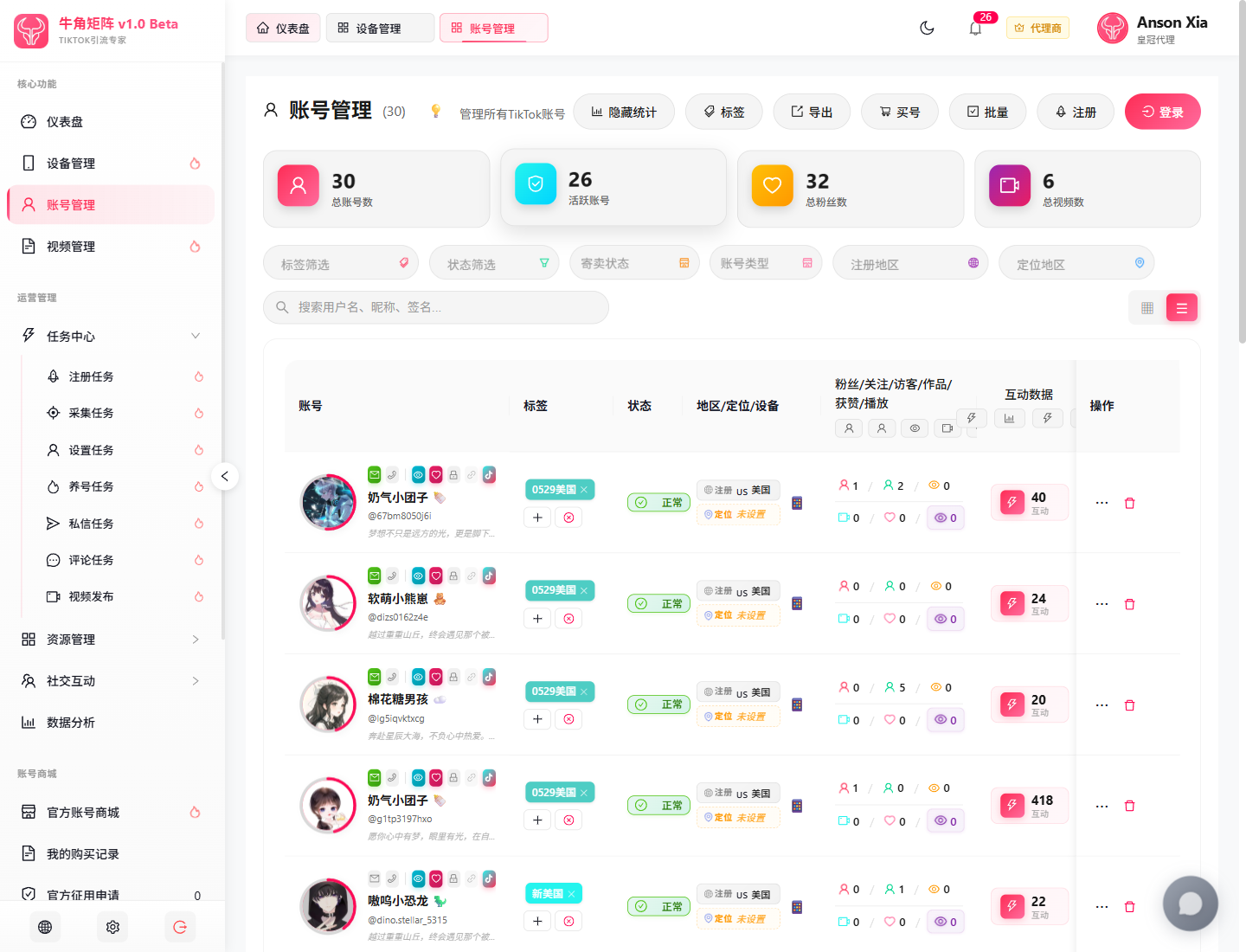
The account page is an asset-pool view. It combines account status, geography, device binding, follower metrics, video metrics, and engagement data in one operational workspace.

Real Product Screenshots 1440 x 1100
BullHorns Matrix account management screenshot showing account metrics, filters, and account list

Focus Points

Top quick actions

Actions like tags, export, buy account, batch, register, and login define account lifecycle management rather than a simple list page.

Multi-dimensional filters

Tags, status, consignment status, account type, registration region, and location region are the core tools for layered asset management.

Dense account rows

Avatar, status, username, signature, region, device link, and engagement data are compressed into one operational row for fast comparison.

Natural link to the store

The “buy account” action makes it clear that account management and the official account store belong to the same asset workflow.

Action Checklist

Start with total accounts and active accounts

This helps users understand real operational quality instead of just raw asset quantity.

Learn filters early

As account count grows, filters become more valuable than manual paging. This is a core habit to build early.

Understand the three growth paths

Buying, registering, and logging in correspond to procurement, system-generated expansion, and existing-account onboarding.

Next Actions

What to do next

Once the relationship between dashboard, devices, and accounts is clear, the next step is operational execution: stabilize devices first, expand the account pool second, and then introduce tasks, top-ups, and procurement.